What Your Workday Application Status Means
Inactive, In Progress, Submitted: Workday statuses are set by each employer. What each one usually means, why no email came, and what changes in 2027.

Ava writes about hiring systems, ATS filters, and what actually moves the needle for job seekers. GetMattered exists to help talented people get past broken application processes.

- Read
- 7min
- Words
- 1,294
From GetMattered
Stop scrolling job boards
Tell GetMattered what you want, swipe through live roles from active employers, and it applies with a resume rewritten for each one. Interviews on your calendar, not rejection emails.
Start getting appliedEach employer sets up its own Workday statuses, so the same word can mean different things at two companies. As a rule of thumb, "Submitted" and "In Progress" mean the application is still open. "Inactive", "Completed" and "Not Selected" mean it is closed: you were declined, you withdrew, or the job itself was cancelled. Workday can change your status without sending you an email, so silence tells you nothing.
Last checked: 2 November 2026.
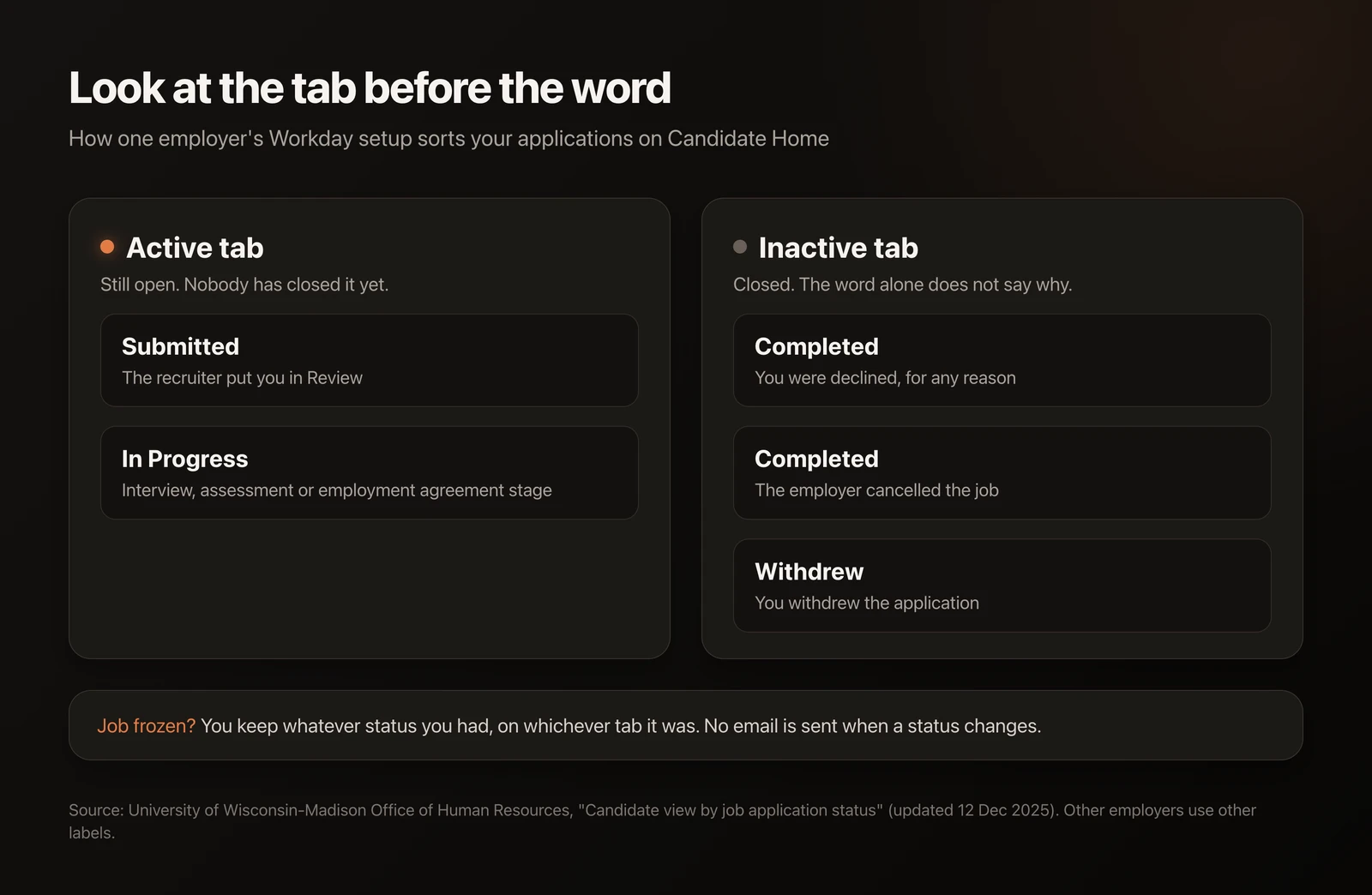
Why does every company show different Workday statuses?
Each employer configures its own Workday site, with its own stages and its own words for them. Two US universities publish the HR guides they use for their own setups, and the labels do not match.
Scorecard
Source: UW-Madison Office of Human Resources, updated 12 December 2025.
The University of Washington uses different words for its candidates: "In Progress" means "Application is under review", "Sent to Dept" means your resume went to the hiring manager, and "Not Selected" means you are "no longer under consideration" (UW Human Resources).
So before you decode a status, look at the tab it sits under. Active or Inactive tells you more than the word does. (If GetMattered sent the application, its Applications tab shows the date and the employer's confirmation, so you know which Workday site and job to check.)
What does "Inactive" mean on Workday?
Inactive means this application is closed. It does not always mean a person read your resume and said no.
In the UW-Madison setup, three different events land you on the Inactive tab: a decline, your own withdrawal, or the employer cancelling the job. The cancelled job shows the same "Completed" label "regardless of reason selected". From your side, a rejection and a cancelled job look identical.
That is why a status can flip to Inactive with no reason given, which is exactly what one job seeker asked about on r/recruitinghell on 23 October. If the same job is still posted a week later, it was probably your application that closed. If the posting is gone too, the job may have been pulled.
What do "In Progress" and "Under Consideration" mean?
Both usually mean you are still in the running.
At UW-Madison, "In Progress" covers every active stage after review: interviews, assessments, even the employment agreement. At the University of Washington it means the application is under review. Both describe an application that is still open.
We could not find a public Workday page that defines "Under Consideration" for candidates. It is one of the labels employers pick. One candidate watched it move back to "In Progress" after interviews (28 October). In the UW-Madison setup, a rejection moves the application to the Inactive tab. A label change while the job stays on your Active tab is a stage change, so check the tab before you worry.
Why did my Workday status change with no email?
Because many setups do not send one. UW-Madison tells its own recruiters that changing a candidate's status "does not send them any kind of notification/communication", and asks them to send a message by hand. The University of Washington does send a disposition notice when you are no longer under consideration.
The only reliable place to read your status is that company's Candidate Home. Sign in on the same Workday site you applied on.
What our Workday applications show
Our agent fills in Workday applications for GetMattered users, and each one leaves a record of when it pressed submit and which emails the employer sent back. Here is what 83 Workday applications sent for 14 people between 17 August and 31 October 2026 show.
Scorecard
Four of the 71 emails are left out of the timing rows. They arrived before the last recorded submit click, because the run was retried after the first try had already gone through.
A Workday confirmation email, when the employer sends one, comes within seconds. If an hour has passed and you have nothing in your inbox or spam folder, open Candidate Home and check that the application says Submitted. And Workday forms are the slowest of the big systems we apply on, even for an agent that does not get tired of dropdowns.
What changes on Workday in 2027?
On 13 October 2026 Workday announced the Candidate Profile. You save your details once and reuse them every time you apply at a company that uses Workday.
- You sign in "with just an email and a one-time code, with no new password to remember".
- About 80% of standard fields come pre-filled, which Workday expects to make applying about 40% faster.
- It is expected to be generally available to Workday Recruiting customers in early calendar year 2027.
- "Employers will not need to change how they hire." Their career site, screening questions and workflows stay in place.
Workday says more than 11,500 organizations use it, including more than 65% of the Fortune 500, so this touches a lot of applications.
The announcement does not say statuses will look the same across companies, and it does not mention one place to track all your Workday applications. Plan on decoding each company's labels for a while yet.
How do I check my Workday application status?
- Open the job link you applied through and sign in on that company's Workday site.
- Go to Candidate Home. Find the job under the Active or Inactive tab.
- Read the tab first, then the label.
- Search your inbox and spam folder for the confirmation email from the day you applied.
- Still unsure after two weeks? Send the recruiter a short note with the job title and requisition number.
One safety check while you are in there: a real Workday employer will not ask you to pay for anything. The FTC puts it plainly: "Honest employers, including the federal government, will never ask you to pay to get a job" (FTC). If you are not sure a Workday link is real, our guide to checking a myworkdayjobs.com link walks through it.
How GetMattered handles Workday applications
Until the Candidate Profile arrives, Workday still means a new account for every employer and the same questions again. This is the part GetMattered takes off your plate.
- You swipe right on a Workday job in Discover. That is the whole input.
- Auto-apply takes it from there. The agent opens the employer's own Workday site, creates the account, verifies the email itself, and fills every page of the form under your name, screening questions and dropdowns included.
- An application only counts as sent once the employer's side confirms it. In the data above, that was Workday's own confirmation email for 71 of 83 applications.
- The confirmation and every later email from the employer land in your GetMattered Inbox (or in your own Gmail or Outlook, if you connected one). The application shows up in Applications with its receipt. When a status changes in Candidate Home with no email, you still have the record of what was sent and when.
You choose how much it does alone: approve each application, swipe right to send, or turn on Auto Apply. Our Workday guide shows what the agent handles on Workday forms, and this comparison covers the other tools that try.
How we made this
This post was drafted with AI help. Every fact links to its source, and each one was checked against that page on 2 November 2026, twice. Our own numbers come from GetMattered's production database, read the same day. They cover real users only: test and staff accounts are excluded. Small samples are marked with their size.
About the author
Ava Bagherzadeh is the founder of GetMattered. She builds it on her own from Germany, including the agent that fills in job applications and the checks that confirm each one reached the employer.