Auto Apply Tools in 2026: The Updated Guide (September 2026)
The useful way to compare auto-apply tools is to follow the application: where it is filed, who submits it, how screening answers are grounded, and what evidence proves the employer received it.

Ava writes about hiring systems, ATS filters, and what actually moves the needle for job seekers. GetMattered exists to help talented people get past broken application processes.

- Read
- 10min
- Words
- 1,258
From GetMattered
Let the applications run themselves
Auto-apply handles the repetitive forms in the background so your job search keeps moving while you do other things.
See how it worksThe best auto-apply tool is not the one that sends the most applications. It is the one that sends the right applications with the right answers, then shows what happened. Before you pay, ask four things: where the application is filed, who performs the final action, how screening answers are grounded, and what evidence proves the employer received it.
Checked 24 September 2026. This guide compares operating models first, then names the three tools buyers most often weigh against GetMattered, Tsenta, Sprout and AIApply, with the facts from their own pages. GetMattered publishes it, so the product section is clearly labeled. No competitor paid for placement.
“The last useful verb belongs to the employer. A tool can fill fields and click submit. Only the employer's system can confirm receipt.”
The quick verdict
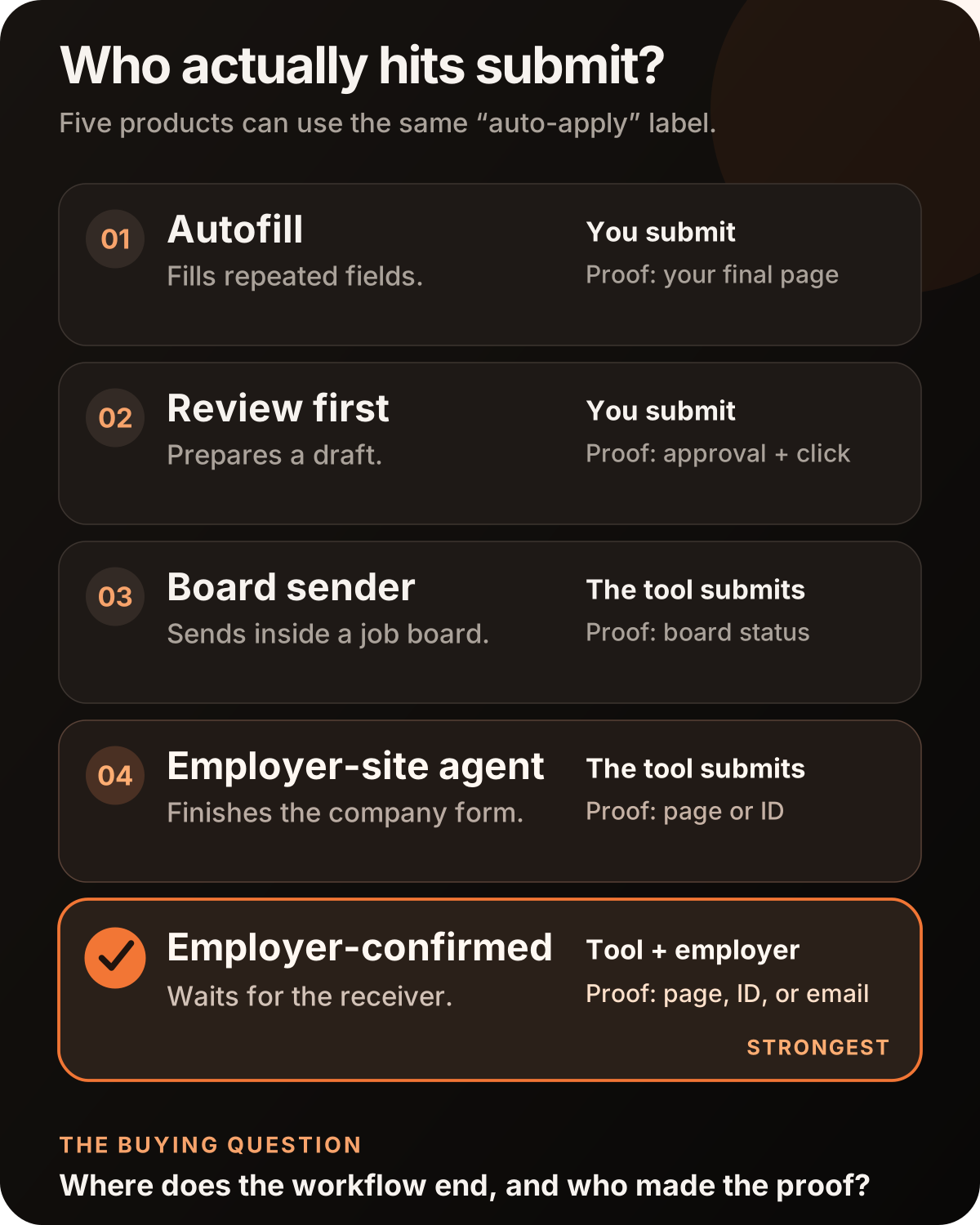
Products called “auto-apply” do five different jobs. Some fill fields and leave you at the button. Some prepare an application and ask you to approve it. Some send from a job board. Some complete the employer's own form. The strongest model also waits for evidence from the employer. Those are not small feature differences. They change who does the work and what can count as evidence.
Scorecard
The table is the comparison. Labels such as “AI,” “copilot,” and “agent” do not tell you where the workflow ends. Follow the application from the job listing to the employer's response.
What we checked, and what we did not
This update checks the mechanics that a buyer can verify in a product flow or its documentation:
- Where the application is filed.
- Whether the user must review or submit it.
- Whether the tool answers open screening questions.
- Whether a weak match can be stopped before send.
- Whether the record includes employer-produced evidence.
Where a competitor is named below, every figure is that competitor's own published number, read on 24 September 2026 and labelled as theirs. This guide publishes no star ratings, and no claim below depends on a private test you cannot inspect.
That narrower method is more useful. A price can change tomorrow. The difference between “we clicked submit” and “the employer confirmed receipt” does not.
Five questions that expose what an auto-apply tool really does
1. Where is the application filed?
A job-board copy of an application is not always the same workflow as the employer's own form. The employer site can contain extra screening questions, account creation, location controls, work authorization fields, and document rules that the board never shows.
If the tool only works inside one board, ask what happens after that board sends you to Workday, Greenhouse, Lever, Ashby, iCIMS, or another applicant tracking system. “We found the job” is not the same as “we completed the application.”
See why the company site and the job board can produce different application paths.
2. Who performs the final action?
There are three honest answers: you submit, the tool submits, or the tool submits and waits for the employer to acknowledge it.
The first model saves typing. The second saves the whole form. The third adds a receipt standard. Pick the model that solves your real bottleneck.
3. What happens to screening questions?
Checkboxes are easy. Open questions are where a generic automation can quietly damage an application.
Ask whether answers come from your actual work history and stated preferences. Ask whether you can inspect what was filed later. A good system should not invent a certification, a title, or years of experience because a form requires an answer.
4. Can it refuse a weak match before spending an application?
More sends can create more noise. The better control is a fit floor that blocks low-match applications before the form starts.
This is where scoring becomes useful. A score printed on a dashboard is only advice. A score connected to the send decision changes what goes out.
5. What proves the employer received it?
The sender cannot be the only witness to its own success. A green check inside the sending tool proves that the tool updated its own database. A screenshot proves what the page looked like at one moment. Neither proves that the employer created an application record.
The strongest signals come from the other side.
Scorecard
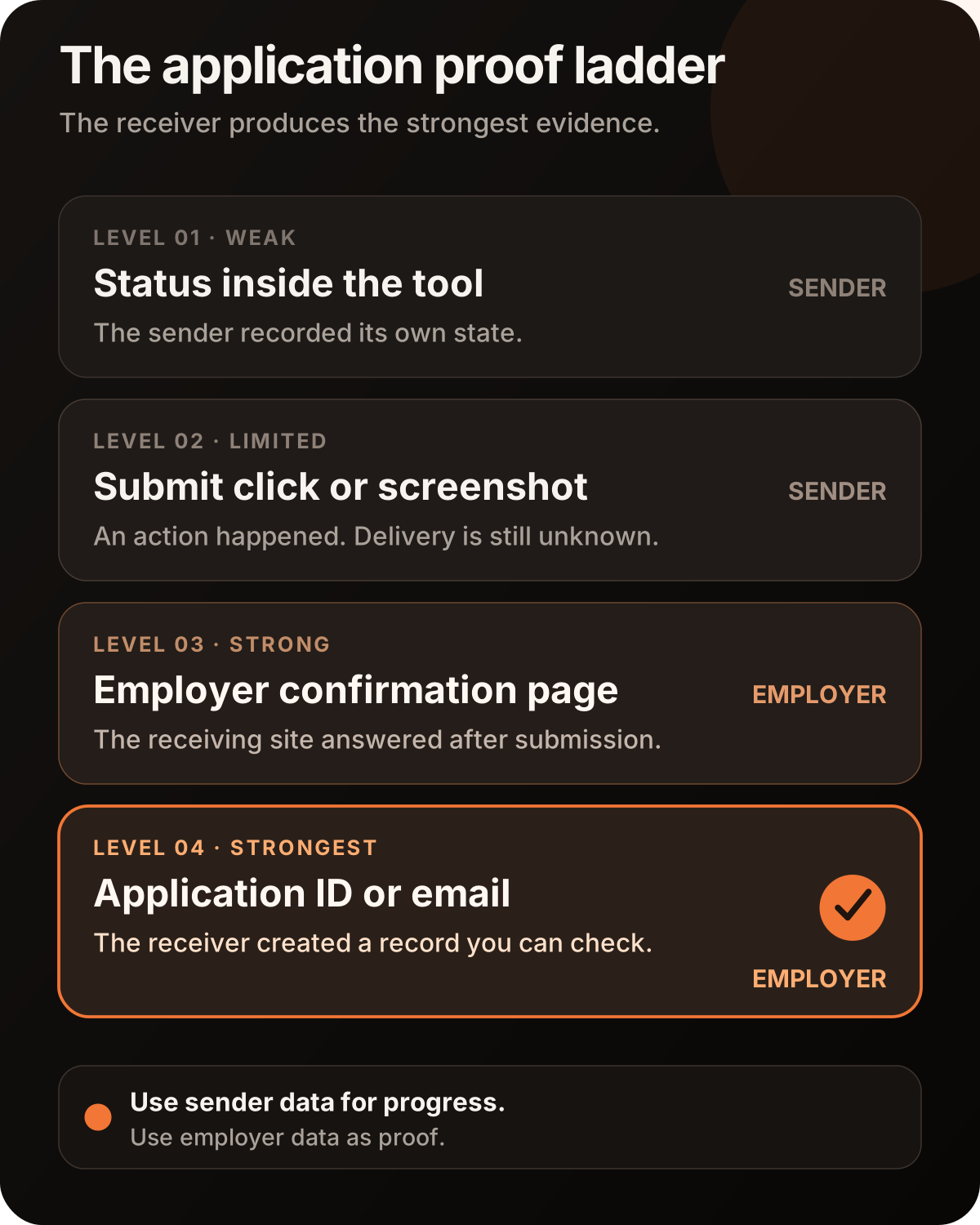
Read the full evidence ladder for submitted job applications.
Where GetMattered fits
GetMattered is built for the employer-confirmed model. It ranks jobs against your resume and preferences, rewrites the resume for the role, answers screening questions from your real history, and completes the employer's own application flow. It runs in the cloud, so your laptop does not have to stay open.
The important part comes after the click. GetMattered keeps the answers and application state in the record, then waits for evidence from the employer's system before treating the application as confirmed. When a portal requires an account or emailed code, the agent handles that path too instead of handing the task back.
What GetMattered is built to replace
Re-entering the same history, rewriting the same resume, answering the same screeners, creating another portal account, and wondering whether the application arrived.
GetMattered lists 34 hiring-system brands. Its live sending paths cover 30 named hiring systems today: Greenhouse, Lever, Ashby, Workday, Personio, Teamtailor, SmartRecruiters, Recruitee, Breezy, Workable, Rippling, BambooHR, JazzHR, softgarden, Jobvite, Gem, Zoho Recruit, Dayforce, Hireology, Dover, Oracle Recruiting Cloud, Paylocity, Oracle Taleo, UKG Pro Recruiting, ADP, Avature, CareerPlug, Pinpoint, Manatal and Eightfold. That is a named list you can check, system by system, before you pay.
GetMattered vs Tsenta, Sprout and AIApply
Buyers who reach this far usually have three names in the other tab. Pricing and other dated facts below remain from our 24 September 2026 review. Workflow and billing corrections were added on 14 October 2026 using official documentation checked on 13 October 2026.
Scorecard
Tsenta offers optional review or automatic submission and documents application receipts. Sprout starts with jobs you select by swiping right; in the web app, turning off Manual Review allows automatic submission after that selection. AIApply sells Auto Apply separately from Premium, with independent resume and cover-letter tailoring add-ons. GetMattered paid plans include tokens and support optional non-expiring token top-ups. Both plans submit jobs you choose, and Hired Yesterday adds optional Autopilot. GetMattered counts an application only when the employer confirms it.
Full head-to-heads: GetMattered vs Tsenta, GetMattered vs Sprout and GetMattered vs AIApply. Every auto-apply tool on one page: the best auto-apply tools roundup.
When a lighter tool is the right choice
An autofill assistant can be enough when you send only a few applications, want to inspect every field, and do not mind finishing each form yourself. A review-before-send tool makes sense when approval is more important than removing the task.
Choose a full agent when the form work is the bottleneck. Choose an employer-confirmed pipeline when uncertainty is the bottleneck too.
The wrong purchase is a tool whose name implies full automation while its workflow ends with “now you finish.”
Your 60-second buying checklist
Before paying for any auto-apply tool, ask:
- Does it submit on the employer's own hiring system?
- Does it finish the form, or stop for my review?
- Are open screening answers grounded in my real history?
- Can I set a fit threshold that blocks weak applications?
- Can I inspect what was submitted?
- What evidence comes from the employer rather than the sending tool?
- Does it handle account walls and verification emails without giving the task back to me?
See how ATS account walls and verification emails change the workflow.
The bottom line
The best auto-apply tool is not the one that sends the most applications. It is the one that sends the right applications with the right answers.
The useful comparison is simple. Who finds the job? Who prepares the application? Who submits it? Who confirms it? The closer the final proof is to the employer, the less you have to trust the tool's own story about what happened.
Stop applying. Start interviewing.
Let GetMattered rank the jobs, tailor the resume, answer the screeners, and finish the employer's form. Start free with no credit card.